Labs · 4 scenarios
Kage Defender Labs
An isolated environment protected by the Microsoft security stack, where we demonstrate how Defender XDR, Defender for Identity and Entra ID detect, block and respond, and how to tune them for your tenant.
STATUS
The lab is being built. Scenario pages go live with recordings, screenshots and detection notes as each demo is completed. Want a live walkthrough sooner? Book a session.
01 — Environment
A real network, protected by the Microsoft stack.
Isolated NAT network 10.10.10.0/24 (no bridge to production), domain kage.lab, dedicated Microsoft 365 test tenant
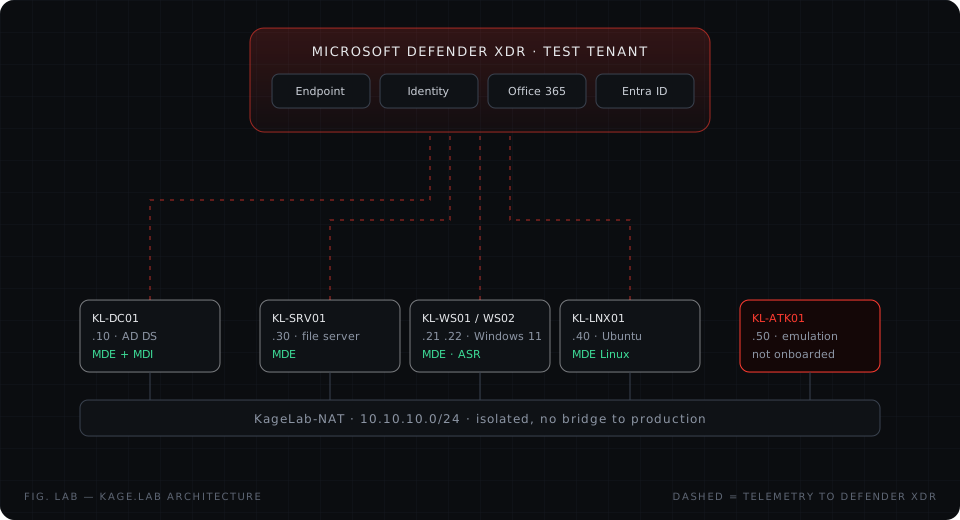
| Host | IP | Role | OS | Protection |
|---|---|---|---|---|
| KL-DC01 | 10.10.10.10 | Domain controller | Windows Server 2022 | Defender for Endpoint + Defender for Identity sensor |
| KL-SRV01 | 10.10.10.30 | File & app server | Windows Server 2022 | Defender for Endpoint (Defender for Servers) |
| KL-WS01 | 10.10.10.21 | User workstation | Windows 11 Enterprise | Defender for Endpoint, ASR rules, tamper protection |
| KL-WS02 | 10.10.10.22 | Admin workstation | Windows 11 Enterprise | Defender for Endpoint, ASR rules, tamper protection |
| KL-LNX01 | 10.10.10.40 | Linux server | Ubuntu Server 24.04 | Defender for Endpoint on Linux |
| KL-ATK01 | 10.10.10.50 | Adversary emulation | Kali Linux + MITRE Caldera | Not onboarded |
02 — Scenarios
See the defence, not just the slide deck.
Each scenario shows what Microsoft Defender detects, how the incident looks to an analyst, and the hardening that closes the gap.
 Endpoint protection in action
How Defender for Endpoint, attack surface reduction rules and tamper protection stop common credential-access and defence-evasion behaviour on Windows 11, and what the analyst sees in the incident queue.
Defender for Endpoint · Defender XDR
View scenario
Endpoint protection in action
How Defender for Endpoint, attack surface reduction rules and tamper protection stop common credential-access and defence-evasion behaviour on Windows 11, and what the analyst sees in the incident queue.
Defender for Endpoint · Defender XDR
View scenario
 Identity threats on-premises
What Defender for Identity reports when Active Directory is being enumerated or abused, and how those signals join endpoint telemetry in one Defender XDR incident.
Defender for Identity · Defender for Endpoint · Defender XDR
View scenario
Identity threats on-premises
What Defender for Identity reports when Active Directory is being enumerated or abused, and how those signals join endpoint telemetry in one Defender XDR incident.
Defender for Identity · Defender for Endpoint · Defender XDR
View scenario
 Cloud identity and email protection
How Defender for Office 365, Entra ID Protection and Conditional Access work together to protect Microsoft 365 sign-ins and mailboxes, including automatic attack disruption.
Defender for Office 365 · Entra ID Protection · Conditional Access · Defender XDR
View scenario
Cloud identity and email protection
How Defender for Office 365, Entra ID Protection and Conditional Access work together to protect Microsoft 365 sign-ins and mailboxes, including automatic attack disruption.
Defender for Office 365 · Entra ID Protection · Conditional Access · Defender XDR
View scenario
 Ransomware readiness
How Defender for Endpoint and Defender for Servers protect recovery options and security tooling, and how automatic attack disruption contains a device before damage spreads.
Defender for Endpoint · Defender for Servers · Defender XDR
View scenario
Ransomware readiness
How Defender for Endpoint and Defender for Servers protect recovery options and security tooling, and how automatic attack disruption contains a device before damage spreads.
Defender for Endpoint · Defender for Servers · Defender XDR
View scenario
03 — Ground rules
Safe by design.
- Fully isolated network and a dedicated test tenant. Nothing touches client or production systems.
- Only published, open emulation frameworks and Microsoft's own evaluation scenarios are used.
- Every session starts from a clean checkpoint and is rolled back afterwards.
- The output is defensive: detections, response actions and hardening you can apply in your own tenant.